Index
IT staff are the people who make the controls real — they configure, operate, and evidence everything the auditor eventually tests. Their variant needs to be authoritative and procedurally complete: less "what you must do" and more "exactly how to do it, what evidence to generate, and where to file it."---
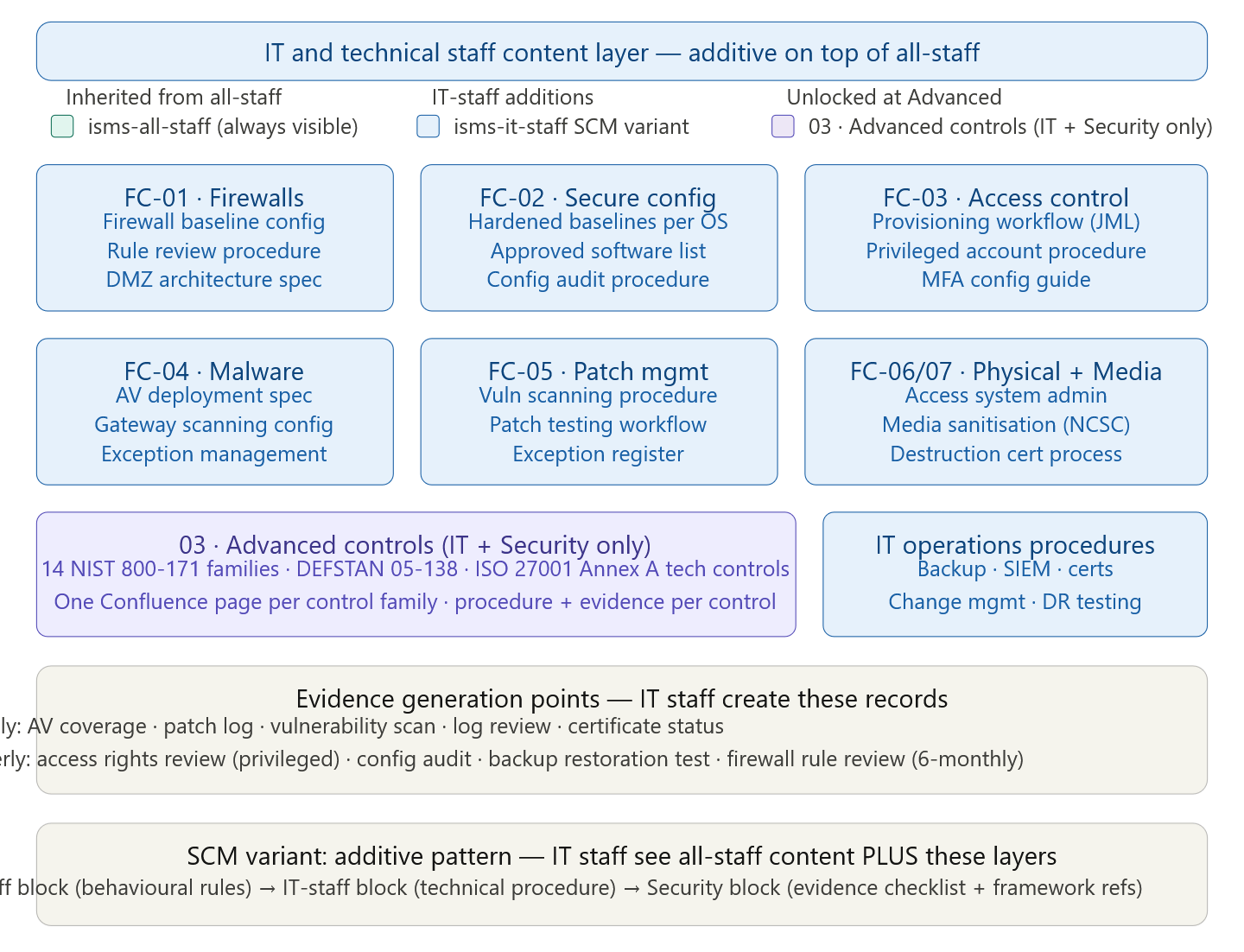
SCM variant configuration for isms-it-staff
In Scroll Content Manager, the isms-it-staff variant is configured as additive inheritance — members of this group see everything the isms-all-staff variant shows, plus the IT-specific blocks. Never configure this as a separate exclusive variant; that forces you to duplicate all the all-staff content and creates a maintenance burden when policies change.
The precise SCM macro pattern for every shared page looks like this:
{scroll-content-variant: isms-all-staff}
  [Plain-language behavioural content — all staff see this]
{scroll-content-variant}

{scroll-content-variant: isms-it-staff}
  [Technical procedure block — IT staff additionally see this]
{scroll-content-variant}

{scroll-content-variant: isms-security}
  [Evidence checklist and control reference text — security team additionally see this]
{scroll-content-variant}
The isms-it-staff group membership should include: IT operations engineers, system administrators, network engineers, helpdesk staff who handle provisioning and de-provisioning, developers (for the secure coding and SDLC content in section 03), and the IT manager. Do not include general managers or line managers — they should be in isms-management which gets governance summaries, not operational procedures.
One SCM configuration detail that matters: set the isms-it-staff variant to also match users who are in isms-security. Security team members need to see IT procedures to audit them. The cleanest way to handle this is to make isms-security a child group of isms-it-staff in your Confluence group configuration, so security members automatically inherit IT-staff content without any SCM duplication.
For the 03 · Advanced Controls section — which is entirely new content rather than an additive block on existing pages — configure the entire section with a page-level restriction set to isms-it-staff and isms-security only, rather than using SCM macros. This keeps the advanced section completely invisible to all-staff and management viewers as a cleaner solution than hiding individual blocks across dozens of pages.
Fundamental controls — IT-staff technical procedure layer
Each of the seven fundamental control pages already carries an all-staff block. The isms-it-staff SCM block sits directly beneath it and contains the operational procedure.
FC-01 · Firewalls and network security — IT procedure
Firewall baseline configuration specification. Define the minimum required state for all boundary firewalls in scope. This specification should live as a Confluence page with the following sections: approved firewall platforms and firmware versions (link to approved hardware list in asset register); default-deny inbound rule with explicit permit exceptions listed by service, port, source IP range, and business justification; outbound filtering rules (categorised block lists, explicit permit for business-required destinations); management interface requirements (out-of-band management plane, MFA on admin console, no management from untrusted networks); and logging requirements (all permit and deny events logged to SIEM, minimum log retention 12 months).
For home-worker and remote-site coverage specifically required by Cyber Essentials: document the minimum acceptable router specification for home workers, including how to verify SPI firewall is enabled and default credentials have been changed. This is the control that most CE assessments reveal as inconsistently implemented.
Rule review procedure. Cyber Essentials explicitly requires a six-monthly firewall rule review with documented results. Your procedure should define: who conducts the review (at minimum the IT manager plus one engineer); what the review covers (each rule checked against its original business justification, source and destination still valid, rule still required, rule still least-privilege); what the output is (a review record page created under EV-F · Continuous Monitoring → Firewall Reviews → [YYYY-H1/H2] recording each rule reviewed, reviewer, outcome, and any rules removed or modified); and the escalation path for rules with no identifiable business justification (remove by default, escalate if removal is disputed).
DMZ architecture specification. For CMMC SC.L1-3.13.5 — the subnetwork segregation requirement — document the current network architecture showing which systems sit in the DMZ (public-facing web servers, email gateways, VPN concentrators, reverse proxies), how the DMZ is isolated from the internal network (separate VLAN, separate firewall rules, no direct routing from DMZ to internal), and what the permit rules are between DMZ and internal network (application-specific, not subnet-wide). This architecture document does not need to be a detailed network diagram — a clear table of segment names, what lives in each, and what inter-segment communications are permitted is sufficient for an audit.
Evidence to generate: Six-monthly firewall rule review record (template link); monthly firewall log review summary (confirm SIEM is receiving firewall logs and alerts are being reviewed); quarterly DMZ architecture review (confirm no unauthorised systems have been added to DMZ).
FC-02 · Secure configuration — IT procedure
Hardened baseline specifications. One sub-page per major platform in your environment. The minimum set for most organisations: Windows 11 workstation baseline, Windows Server 2022 baseline, macOS baseline (if applicable), network device baseline (routers and switches), mobile device baseline (iOS and Android via MDM). Each baseline page should reference the corresponding CIS Benchmark version you are implementing, list the specific settings applied (with the CIS control ID, the required value, and how to verify compliance), and note any settings where you have deviated from the CIS recommendation with a documented business justification.
The CIS Benchmark deviation log is important for NIST 800-171 3.4.2 (establish and enforce security configuration settings) — assessors will ask not just whether you have a baseline but whether you have justified your deviations. Keep deviations in a table on the baseline page: setting name, CIS recommendation, your organisation's implementation, justification, risk acceptance date.
Approved software list procedure. Maintain the approved software list as a table on a dedicated child page. Columns: software name, version(s) approved, approved use cases, approved user roles, approval date, approver, next review date. The procedure for adding software to the list: submit request via helpdesk; IT manager assesses security risk (vendor reputation, licence terms, data access required, update frequency); CISO approves for software accessing sensitive data; approval logged in the table. The procedure for removing software: IT identifies software no longer required or end-of-life; removed from approved list; MDM policy updated to block/uninstall; asset register updated. This procedure directly satisfies CE Secure Configuration and NIST 3.4.8 (restrict use of unauthorised software).
Configuration audit procedure. Quarterly check that live systems match their approved baselines. Define: which tool you use for configuration scanning (e.g. Microsoft Defender for Endpoint configuration assessment, Tenable Nessus, or CIS-CAT); which systems are in scope per quarter (rotate through all systems over the year); what the output format is (scan report exported and attached to evidence page); what the remediation SLA is for deviations (critical setting deviation: 14 days; non-critical: 60 days); and how the audit record is filed (child page under EV-D · Config Management → Config Audits → [YYYY-QQ]).
Evidence to generate: Quarterly configuration audit records with scanner output; monthly approved software list review (confirm list is current and no unapproved software detected by MDM); per-change update to configuration baselines when a new OS version or major platform update is deployed.
FC-03 · User access control — IT procedure
This is the highest-evidence-burden control domain. IT staff generate more evidenceable records here than anywhere else, and the joiner-mover-leaver process is the most frequently audited operational control across all five frameworks.
Joiner procedure. When HR notifies IT of a new starter (notification must arrive at least two working days before start date — document this SLA in the procedure and chase if not received): create the user account using the standard naming convention; assign to the appropriate security groups based on the role profile (maintain a role-profile table defining standard group memberships per job type — this is what makes provisioning consistent and auditable); configure MFA before account activation; send credentials via a secure channel separate from the MFA enrollment link; record the provisioning in the JML log (page EV-D · Access Control → Joiner-Mover-Leaver Log) with: employee name, role, start date, account creation date, approver, groups assigned, MFA enrolled. The JML log record is the evidence item that CMMC IA.L1-3.5.1 assessors will ask to see.
Mover procedure. When HR or the line manager notifies IT of a role change: review current access against the new role profile; remove access no longer required (same day as role change takes effect); add new access only after line manager approval for non-standard access; record the change in the JML log with: employee name, old role, new role, effective date, access removed, access added, approver. Role changes are where over-provisioning accumulates — someone moves from finance to operations and retains all the finance system access. The mover procedure prevents this systematically.
Leaver procedure. This is the most time-sensitive process in the entire ISMS. The procedure must define a hard sequence with timestamps: on notification of departure (from HR or line manager, no later than the day before the last working day) — disable the account in Active Directory (do not delete — disabled accounts preserve the audit trail and allow data recovery if needed); revoke VPN certificates; remove from all cloud service accounts (Microsoft 365, AWS, GitHub, Salesforce, etc. — maintain a per-system leaver checklist); revoke physical access card; forward email to line manager or nominated successor for a defined period (agree with HR — typically 30 days); record in JML log with: employee name, last working day, account disable timestamp, cloud service revocations (list each service), physical access revocation timestamp, equipment return confirmed. For involuntary leavers, the disable timestamp must be on or before the last working day — document this as a hard requirement with no exceptions.
Privileged access management procedure. Separate procedure for admin accounts: list all privileged accounts and their holders (maintain in a table — this is the PAM inventory); quarterly review of whether each privileged account is still needed and still held by the correct person (this is the EV-D01 quarterly review); policy that admin accounts are never used for day-to-day work (separate standard and admin accounts per person); break-glass emergency account procedure (sealed, stored in physical safe, access logged on each use, password changed after each use); privileged session logging where technically feasible (document which systems have this capability and which do not, with justification for gaps).
MFA configuration guide. A practical step-by-step for each platform you use (Entra ID / Azure AD, Google Workspace, AWS IAM) covering: enabling MFA as a conditional access requirement (not optional); acceptable second factors (authenticator app preferred; SMS as fallback only with documented justification; hardware tokens for highly privileged accounts); how to handle MFA registration for new starters; MFA recovery procedure for lost devices (critically — this must require identity verification before recovery, not just a backup code that anyone could use); quarterly coverage report procedure (export from your identity provider showing MFA enrollment rate — target 100% for internet-accessible accounts).
Evidence to generate: JML log entries per event; quarterly privileged account access review record; quarterly MFA coverage report; annual all-user access review (spreadsheet with manager sign-off per row); monthly account audit (check for accounts with no recent login activity — potential orphaned accounts).
FC-04 · Malware protection — IT procedure
AV deployment specification. Document: approved AV platform and version; deployment method (MDM policy, GPO, package manager); required configuration settings (real-time scanning enabled; scheduled full scan weekly; PUA detection enabled; network protection enabled; cloud-delivered protection enabled); signature update cadence (automatic, check frequency — every four hours is the standard for enterprise AV); update failure alerting (SIEM alert if a device has not received a signature update in more than 24 hours); exclusion policy (any AV exclusions must be formally approved and documented — undocumented exclusions are a common finding and a real security risk).
Gateway scanning configuration. For CMMC SI.L1-3.14.2 compliance, endpoint AV alone is not sufficient — you need boundary-level malware filtering. Document: email gateway scanning configuration (your email security platform — Microsoft Defender for Office 365, Proofpoint, Mimecast, etc. — with specific settings: file type blocking, link detonation, attachment sandboxing); web proxy or DNS filtering configuration (categories blocked, custom block list management); SIEM integration (gateway scan events forwarded to SIEM and alerts configured for high-severity detections).
AV exception procedure. When a legitimate business file or process is incorrectly blocked by AV: engineer submits exception request with justification; IT manager or CISO approves; exception logged with: filename or path, reason blocked, business justification for exception, approver, date, review date (exceptions should be reviewed quarterly and removed when no longer needed); exception applied in AV management console with the minimum scope necessary (file-specific or process-specific, never directory-wide unless justified). Undocumented AV exceptions are one of the most common technical findings in CMMC and DEFSTAN assessments.
Malware incident response. A concise sub-procedure (or link to the full incident response playbook) specifically for malware detections: contain immediately (isolate the affected device from the network via MDM or physical disconnection); identify scope (check SIEM for lateral movement indicators, check AV console for other affected devices); preserve evidence before reimaging (forensic image if required by incident severity); remediate (reimage from known-good build, restore data from backup, verify backup integrity before restoration); recover and verify (reconnect to network only after AV scan confirms clean); document (create incident record under EV-D11 and investigation report under EV-D12).
Evidence to generate: Monthly AV coverage report (percentage of devices with AV deployed and signatures current — exported from AV management console); monthly gateway scanning summary (volume of detections, blocked attachments, suspicious links — from email security platform); quarterly AV exception review (confirm all exceptions still valid); per-incident detection records (automated from AV console, referenced in incident log).
FC-05 · Patch management — IT procedure
Vulnerability scanning setup. Document: scanning tool and version in use; scan schedule (authenticated scan against all in-scope systems, minimum monthly — weekly for internet-facing systems); scan authentication method (domain service account with local admin rights, or agent-based); scope definition (which IP ranges and systems are in scope); SIEM integration (scan results forwarded or exported to SIEM for trending); output format (scan report exported in both raw XML and executive summary PDF — both retained in evidence).
Patch testing workflow. For organisations with a test environment: patches are applied to test systems first; soak period of five working days for non-critical patches (shorter for critical); if no adverse effects observed, approved for production deployment via change management. For organisations without a test environment (common for SMEs): critical patches are applied immediately to production with a defined rollback procedure; non-critical patches are batched monthly and applied during a change window with rollback capability documented. The testing workflow must be documented even if it is minimal — "we apply critical patches immediately and trust the vendor" is not a procedure.
14-day SLA tracking. Build a patch tracking table or integrate with your vulnerability scanner's remediation tracking. Each critical or high-severity vulnerability gets a row: CVE reference, affected system(s), patch released date, detection date (from scan), target remediation date (released date + 14 days), actual remediation date, days to remediate. This table is reviewed monthly and presented at the monthly security metrics report. The table is your primary evidence for Cyber Essentials and CMMC SI.L1-3.14.1 compliance — without it, you cannot demonstrate timely patching even if you are actually patching on time.
Patch exception procedure. When a patch cannot be applied within the SLA: engineer documents the exception (system affected, patch, reason for exception, compensating control implemented, risk owner, risk acceptance date, target remediation date); IT manager approves for standard systems; CISO approves for systems handling sensitive data or CUI; exception logged in patch exception register (EV-D08); exception reviewed monthly until closed. Common legitimate exceptions: legacy system with no vendor patch available (requires vendor end-of-life plan or compensating network isolation); system that cannot be patched without extended downtime (requires change window scheduling with business approval); third-party managed system where patching is contractual (requires supplier engagement evidence).
Vendor security bulletin subscription. Document which vendor security bulletin feeds the team subscribes to and how they are triaged. At minimum: Microsoft Security Update Guide (monthly Patch Tuesday); NCSC Weekly Threat Report; CISA Known Exploited Vulnerabilities catalogue (for US government contract obligations); vendor-specific bulletins for all software in your approved software list. Triage procedure: each bulletin reviewed by named engineer; CVEs assessed for applicability to your environment; applicable CVEs added to patch tracking table. This process is what transforms SI.L1-3.14.1 from a patching SLA into a genuine vulnerability management programme.
Evidence to generate: Monthly vulnerability scan reports (raw and summary); monthly patch tracking table snapshot; monthly patch exception register review; per-exception formal risk acceptance records.
FC-06 and FC-07 · Physical protection and media protection — IT procedure
Access control system administration. Procedure for managing electronic access control: issuing new access cards or credentials (approved by facilities manager and system owner; logged in access device register); revoking access (immediate on leaver notification; logged with timestamp); access level changes (follow same approval process as logical access provisioning); monthly audit of access card inventory (count of issued cards vs registered devices — unaccounted cards are a physical security incident). For organisations using PIN-based access only: document the PIN change procedure and frequency (minimum annually; immediately on any security event).
Physical access log review. Quarterly review of electronic access logs: pull all access events for the quarter; identify anomalies (access outside normal working hours, access by accounts that should have been revoked, failed access attempts that could indicate tailgating or badge-sharing attempts); document review with findings and actions; file in EV-D · Physical Security → Access Log Reviews → [YYYY-QQ].
Media sanitisation procedure. This is one of the most commonly evidenced gaps in CMMC assessments. The procedure must cover every media type and specify the method for each: HDDs — overwrite using NCSC-approved tool (Blancco, DBAN, or equivalent) to HMG IS5 Enhanced standard; SSDs and NVMe drives — manufacturer secure erase via firmware command where supported, otherwise physical destruction (SSDs cannot be reliably overwritten due to wear-levelling); USB drives and SD cards — physical destruction (shredding or degaussing via approved facility); optical media (CDs, DVDs) — physical shredding; mobile phones and tablets — factory reset via MDM followed by manufacturer wipe verification. For each disposal event, log in the media sanitisation record (EV-D26): date, device ID from asset register, media type, method used, tool and version, operator, and whether a destruction certificate was obtained (required for physical destruction via third party).
Destruction certificate process. For all third-party disposal: use only ADISA-certified or equivalent approved destruction vendors; obtain a destruction certificate for every consignment specifying device serial numbers or asset IDs; file certificate in EV-D25 permanently (no retention limit — these records may be needed years later in an incident investigation or CMMC audit). Never use a general IT recycling service without confirming they provide individual asset certificates — bulk recycling without per-asset certificates does not satisfy CMMC MP.L1-3.8.3.
Evidence to generate: Per-disposal media sanitisation records; per-consignment destruction certificates from approved vendors; quarterly physical access log review records; monthly access device inventory audit.
Section 03 · Advanced controls — IT and security only
This section is hidden from all-staff and management via page-level Confluence restrictions. It contains the full 14-family NIST 800-171 implementation, the DEFSTAN 05-138 Profile 2 technical controls, and the ISO 27001 Annex A technical control group (section 8, controls 8.1–8.34). Structure it as a parent page with one child page per NIST 800-171 control family.
Parent page: 03 · Advanced controls. Visible to IT-staff and security only. Contains: the NIST 800-171 family index (14 families, control counts, link to each child page); the three-way control mapping table from your Reference Library (NIST control ID → ISO 27001 Annex A → DEFSTAN reference); a DEFSTAN 05-138 Profile 1 vs Profile 2 overview explaining which controls are Profile 1 (equivalent to Fundamental tier) and which are Profile 2 additions; and the System Security Plan (SSP) template and current SSP document (the CMMC SSP lives here — link to it prominently, as it is what a C3PAO assessor will read first).
Each of the 14 child pages follows a consistent structure. Taking AC (Access Control) as the example:
Page title: AC · Access Control — NIST 800-171 / CMMC. The page opens with a summary table: all 22 AC controls listed with their ID (3.1.1 through 3.1.22), CMMC practice ID where applicable, current implementation status (implemented / partially implemented / planned), and link to the evidence record. This summary is what populates the SSP.
Below the summary, each control gets a dedicated section: the control text verbatim from NIST SP 800-171 Rev 2; the CMMC practice text where different; the ISO 27001 Annex A cross-reference; the DEFSTAN 05-138 cross-reference; how this organisation implements the control (the "implementation description" that goes into the SSP — this must be a factual description of the specific technical mechanism, not a policy statement); the evidence items that demonstrate implementation; and the assessment method from NIST SP 800-171A (examine, interview, or test — knowing this helps IT staff understand exactly what a C3PAO assessor will do).
The 14 control family pages to create in section 03 are: AC (Access Control, 22 controls), AT (Awareness and Training, 3 controls), AU (Audit and Accountability, 9 controls), CM (Configuration Management, 9 controls), IA (Identification and Authentication, 11 controls), IR (Incident Response, 3 controls), MA (Maintenance, 6 controls), MP (Media Protection, 9 controls), PE (Physical Protection, 6 controls), PS (Personnel Security, 2 controls), RA (Risk Assessment, 3 controls), CA (Security Assessment, 4 controls), SC (System and Communications Protection, 16 controls), and SI (System and Information Integrity, 7 controls).
The three control families with the most IT implementation complexity — and therefore the most procedure content — are SC (System and Communications Protection, covering encryption, network segmentation, and boundary protection), AU (Audit and Accountability, covering logging, log review, and SIEM), and CM (Configuration Management, covering baselines, change control, and software management). Prioritise building these three pages first.
IT operations procedures library
Beyond the fundamental and advanced control pages, IT staff need a set of operational procedure pages that are not tied to a specific control but support the evidence-generation cycle. Create these as a child section under 02 · Fundamental Controls or as a separate IT Operations parent page, visible only to the isms-it-staff and isms-security groups.
Backup and recovery procedure. Backup schedule (which systems, which data, what frequency — full weekly, incremental daily is typical); backup destination and encryption (3-2-1 rule documented: three copies, two media types, one offsite or cloud — and confirmation that backups are encrypted at rest using an approved algorithm); monitoring (how backup job success and failure is monitored — SIEM alerting for failed jobs, email notification to IT team); restoration test procedure (quarterly test covering at minimum one critical system — test plan template, execution log, result recorded in EV-D28); and RTO/RPO alignment (confirm that backup frequency and retention period satisfy the BIA-defined RPO for each system in scope).
Certificate management procedure. Certificate inventory (all TLS certificates, code-signing certificates, and internal PKI certificates — maintained in EV-D30 with expiry dates and responsible owners); renewal procedure (standard commercial certificates renewed via ACME automation where possible; manual renewal procedure for those that cannot be automated); alert configuration (SIEM or monitoring platform alert at 60 days, 30 days, and 7 days before expiry — certificate expiry causing an outage is a finding that affects both the technical control assessment and business continuity obligations); revocation procedure (for compromised keys — who has authority to initiate revocation, how the new certificate is deployed, how systems are updated).
SIEM and logging procedure. Log source inventory (which systems send logs to SIEM — maintained as a table with: system name, log type, forwarding method, expected daily volume, last verified date); onboarding new log sources (when a new system is deployed, it must be added to the SIEM within 30 days of go-live — procedure for configuring the forwarder, verifying log receipt, and adding to the inventory); alert rule management (documented set of SIEM alert rules with: alert name, trigger condition, severity, assigned analyst, required response time, escalation path); monthly log review record (template and filing procedure — EV-F01); log retention configuration (minimum 12 months online, confirm platform configuration matches this).
Infrastructure change management. Change categories (standard changes pre-approved by type — routine patching, password resets, certificate renewal; normal changes requiring CAB approval; emergency changes requiring retrospective approval within 48 hours); RFC template (change description, systems affected, implementation steps, test steps, rollback plan, approval, scheduled maintenance window); CAB composition and meeting cadence; post-implementation review procedure (confirm change succeeded, confirm no adverse effects, close the change record in EV-D21); emergency change retrospective (held at next CAB meeting, formal approval recorded).
DR and BCM testing procedure. Annual DR failover test plan template (scope, objectives, success criteria, test scenario, step-by-step execution log, results against RTO/RPO targets, lessons learned, improvement actions); six-monthly tabletop exercise template (scenario, facilitator guide, participant list, outcomes, action log); test records filed in EV-D · BCM → Exercises. Critically — document what "test passed" means before you run the test. RTO met if system restored within X hours; RPO met if data recovered to within Y hours of the incident. Testing without success criteria produces a record that an assessor cannot evaluate.
Evidence ownership and generation calendar
IT staff generate the majority of the operational evidence in categories D and F of your evidence register. Attach a personal responsibilities table to the IT staff section of the home page — one row per IT team member or role, one column per evidence item, with due dates and the Confluence location where the evidence is filed. This is the operationalisation step that turns documentation into a running compliance programme rather than a periodic audit scramble.
The monthly rhythm for IT staff looks like this: on the first working day of each month, run the vulnerability scan and export the report; pull the AV coverage report from the management console; review the SIEM alert log and write the monthly log review record; pull the patch tracking table and flag any SLA breaches; check the certificate inventory for anything expiring within 60 days; and update the security metrics report. This set of monthly actions takes a practiced IT engineer roughly half a day and generates the continuous monitoring evidence that keeps the ISMS alive between audit cycles.