Index
The colour coding carries the key insight: teal = covered by all three frameworks, amber = CMMC Level 1 only (no Cyber Essentials equivalent). Click any domain for a detailed breakdown.
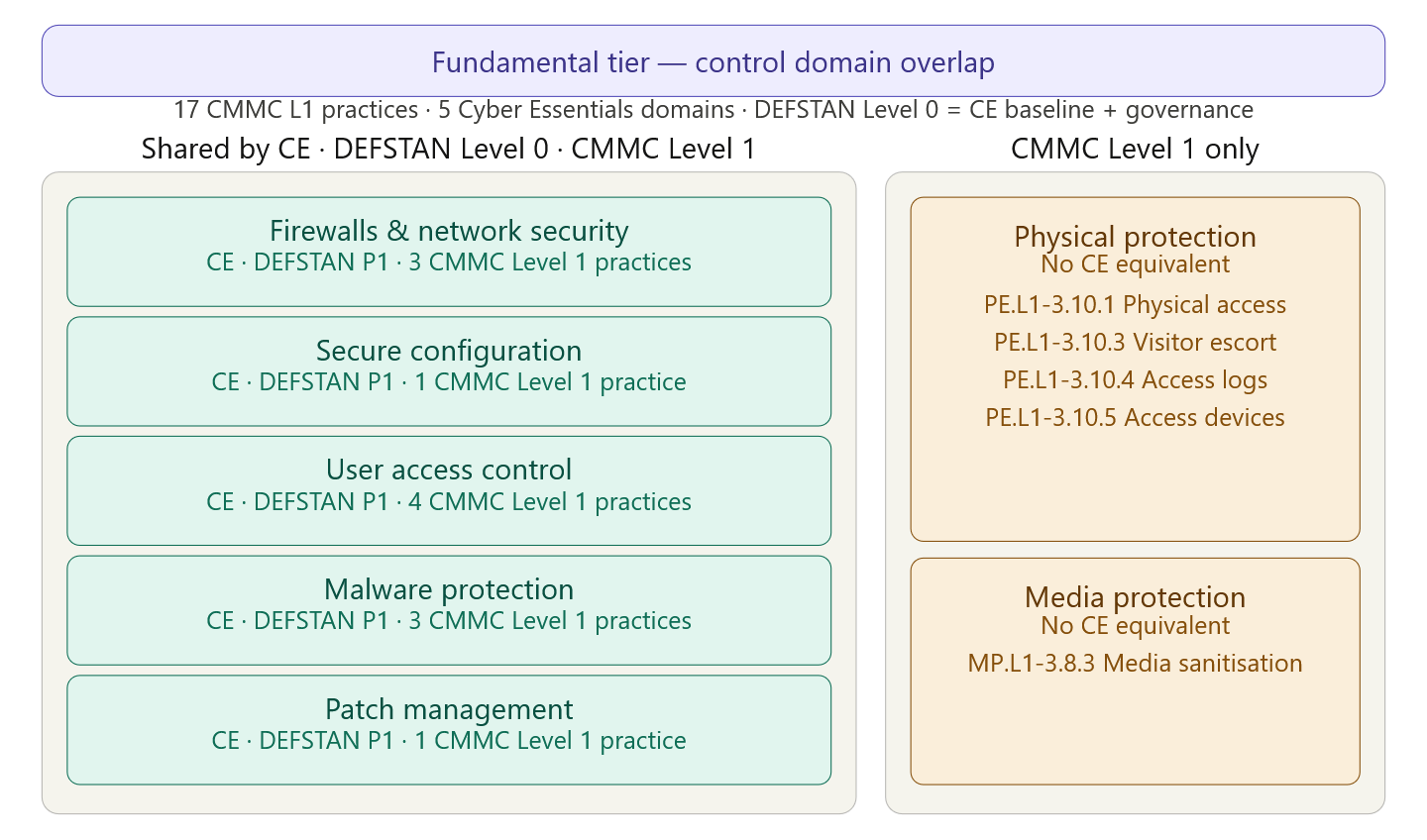
The left column (teal) shows where all three frameworks agree — these five domains let you write one Confluence page that simultaneously satisfies Cyber Essentials certification, DEFSTAN Level 0 assessment, and CMMC Level 1 attestation. The right column (amber) shows where CMMC Level 1 goes beyond CE and DEFSTAN Level 0 — physical protection and media protection have no CE counterpart and need separate pages scoped to staff with physical facility access.
DEFSTAN Level 0 — what it actually requires
DEFSTAN Level 0, in the UK MOD Cyber Security Model, is defined as Cyber Essentials self-assessed. This means the five CE technical domains are the entire technical control set. What DEFSTAN adds beyond CE is a thin governance layer: a written information security policy, documented incident reporting arrangements (including notification to the MOD/NCSC), and a named point of contact for security matters. These governance additions slot directly into your ISO 27001 policy pages rather than requiring new Fundamental tier control pages.
The practical implication for Confluence authoring is that any supplier passing Cyber Essentials and holding your ISO 27001 policies automatically meets DEFSTAN Level 0. You do not need separate DEFSTAN pages — you need to add DEFSTAN reference labels to the five CE-domain control pages and to the Information Security Policy.
The five shared domains in full
Domain FC-01: Firewalls and network security
Cyber Essentials requirement: A boundary firewall or equivalent must protect all devices that connect to the internet. For home workers, the router must have stateful packet inspection enabled and a changed default password. The default-deny inbound rule must be in place. All firewall rules must be documented, reviewed every six months, and any unused rules must be removed.
DEFSTAN Level 0 addition: Same as CE. DEFSTAN adds the requirement for the rule review to be formally recorded and retained as evidence.
CMMC Level 1 practices (3 of 17):
SC.L1-3.13.1 — Monitor, control, and protect organisational communications at external boundaries and key internal boundaries. This is broader than CE's perimeter firewall alone — it requires active monitoring of boundary traffic, not just filtering. In practice: firewall logs must be reviewed, and there must be a defined process for what happens when the firewall blocks traffic (alerting, escalation).
SC.L1-3.13.5 — Implement subnetworks for publicly accessible system components that are physically or logically separated from internal networks. This is the DMZ requirement. Any web server, email gateway, or public-facing application must sit in a segment isolated from the internal corporate network. This goes further than the CE Firewalls domain, which does not explicitly require network segmentation.
AC.L1-3.1.20 — Verify and control connections to external information systems. This covers connections to external systems (cloud services, partner networks, contractor access) as well as connections from them. Any connection to an external system not under organisational control must be explicitly authorised and documented. This maps to your firewall outbound rules and your cloud services inventory.
Key difference between CE and CMMC SC.L1: CE asks whether you have a boundary firewall; CMMC asks whether you are actively monitoring and controlling what crosses it. An organisation can pass CE with a correctly configured firewall and no monitoring, but would fail CMMC without the logging and alerting that SC.L1-3.13.1 implies.
Domain FC-02: Secure configuration
Cyber Essentials requirement: All computers and network devices must be configured to reduce the level of inherent vulnerability and provide only the functions required. Specifically: default passwords must be changed before deployment, unnecessary user accounts must be removed or disabled, unnecessary software and services must be removed, and auto-run must be disabled for removable media. The CE scheme requires an inventory of all software in use as part of the assessment.
DEFSTAN Level 0 addition: Identical to CE. DEFSTAN adds the requirement for the software inventory to be formally maintained and reviewed.
CMMC Level 1 practices (1 of 17):
AC.L1-3.1.22 — Control information posted or processed on publicly accessible information systems. This is the publicly accessible systems control and sits in the Secure Configuration domain because it concerns what data and functionality is exposed on public-facing systems. Any public website, customer portal, or externally accessible application must be reviewed to ensure it does not inadvertently expose CUI (Controlled Unclassified Information) or internal data. This requires a periodic review process — who authorised what is public, and is that still appropriate?
Key difference: CE Secure Configuration is about hardening internal systems. CMMC AC.L1-3.1.22 is about controlling public exposure. These are complementary; together they form a complete secure configuration posture.
Domain FC-03: User access control
Cyber Essentials requirement: User accounts must only be provided to authorised individuals, special access privileges must be controlled and limited to those who need them for their work, and admin accounts must not be used for normal day-to-day activities. MFA must be enabled on all accounts that can be accessed from the internet — this includes email (Microsoft 365, Google Workspace), cloud storage, remote access, and any user-facing admin interface. Accounts must be reviewed at least annually, and accounts that are no longer needed must be removed.
DEFSTAN Level 0 addition: Identical to CE. DEFSTAN adds the requirement for the account review to be formally documented with evidence retained.
CMMC Level 1 practices (4 of 17):
AC.L1-3.1.1 — Limit information system access to authorised users, processes acting on behalf of authorised users, or devices. This is the access control foundation: only identified and authorised entities may access systems. Every user must have a formally provisioned account. The "processes and devices" language is important — service accounts and authorised devices must also be formally registered, not just people.
AC.L1-3.1.2 — Limit access to the types of transactions and functions that authorised users are permitted to execute. Role-based access control. A finance user should not be able to access engineering system files. A read-only user should not have write permissions. This is the functional restriction that sits above simple authentication — it is not enough to know who someone is; you must also limit what they can do.
IA.L1-3.5.1 — Identify information system users, processes acting on behalf of users, or devices, as a prerequisite to allowing access. Every user must have a unique identifier — no shared accounts, ever. Service accounts must be individually registered. Device identities must be managed (MAC address whitelisting, certificate-based authentication, or MDM enrolment).
IA.L1-3.5.2 — Authenticate the identities of those users, processes, or devices before allowing access. Authentication must be performed before access is granted — not after. Passwords plus MFA for internet-accessible systems is the minimum. The authentication mechanism must be commensurate with the sensitivity of what is being accessed.
Key difference: CE UAC focuses on practical controls (change passwords, use MFA, remove old accounts). CMMC AC.L1 and IA.L1 add a formal identity model — every accessor must be explicitly identified and their identity verified, not just their credentials presented. The CMMC requirement implies an identity register, which most CE assessments do not explicitly test.
Domain FC-04: Malware protection
Cyber Essentials requirement: Anti-malware software must be installed on all devices that can be infected by malware (all PCs, laptops, and tablets running Windows, macOS, or Linux; mobile devices where technically feasible). Signatures must be kept up to date — at minimum daily automatic updates. Real-time, on-access scanning must be enabled. Execution from removable media must be blocked or restricted.
DEFSTAN Level 0 addition: Identical to CE. DEFSTAN adds the requirement for malware scanning to be formally logged and evidence retained for review.
CMMC Level 1 practices (3 of 17):
SI.L1-3.14.2 — Provide protection from malicious code at appropriate locations within organisational information systems. "Appropriate locations" is deliberate — protection is required not just on endpoints but also at network gateways (email filtering, web proxy, firewall IPS), file servers, and any system that receives or processes files from external sources. Endpoint AV alone is not sufficient; you also need boundary-level malware filtering.
SI.L1-3.14.4 — Update malicious code protection mechanisms when new releases are available. Automatic updates for AV signatures must be enabled. Where automatic updates are not possible (air-gapped systems), a formal manual update procedure must be documented and followed. The cadence must be "when new releases are available" — not weekly or monthly. Modern AV products release signatures multiple times per day.
SI.L1-3.14.5 — Perform periodic scans of the information system and real-time scans of files from external sources as files are downloaded, opened, or executed. Two distinct requirements: (a) scheduled full-system scans at least weekly, and (b) real-time on-access scanning for files from external sources. The "external sources" language includes email attachments, downloaded files, files copied from USB, and files received via collaboration tools.
Key difference: CE Malware Protection requires AV on endpoints with current signatures. CMMC SI.L1 adds the boundary scanning requirement (SI.L1-3.14.2), which means email gateway scanning, web proxy malware filtering, and network-level threat detection — not just desktop AV.
Domain FC-05: Patch management
Cyber Essentials requirement: All software must be licensed, supported by the vendor, and kept up to date with security patches. Critical and high-severity patches must be applied within 14 days of release. Software that is no longer supported (end-of-life) must be removed or given a documented exception with a compensating control. The operating system auto-update feature should be enabled where possible for end-user devices.
DEFSTAN Level 0 addition: Identical to CE. DEFSTAN adds the requirement for the patch review process to be formally documented and evidence retained of patches applied, with any exceptions formally risk-accepted.
CMMC Level 1 practices (1 of 17):
SI.L1-3.14.1 — Identify, report, and correct information and information system flaws in a timely manner. The "identify and report" requirement goes beyond CE's 14-day patching SLA. Organisations must have a process for identifying vulnerabilities (vulnerability scanning, vendor security bulletins, threat intelligence feeds), formally documenting flaws when found, and tracking remediation to closure. An organisation can apply patches within 14 days and still fail SI.L1-3.14.1 if there is no documented process for discovering vulnerabilities in the first place.
Key difference: CE says "apply patches within 14 days." CMMC SI.L1-3.14.1 says "have a documented vulnerability management process that identifies, tracks, and remediates." Vulnerability scanning is strongly implied — a passive approach of waiting for vendor notifications is insufficient for CMMC.
The two CMMC-only domains
Domain FC-06: Physical protection
These four practices have no Cyber Essentials equivalent because CE focuses exclusively on cyber/technical controls. They do align with DEFSTAN Level 0 §Physical section, so the Confluence page for this domain should reference both CMMC and DEFSTAN. The corresponding ISO 27001 Annex A controls are 7.1 through 7.6.
PE.L1-3.10.1 — Limit physical access to organisational information systems, equipment, and operating environments to authorised individuals. This means: server rooms must be locked with access restricted to named individuals; workstations in open-plan offices must have screen locks; printers holding sensitive documents must be in controlled areas. This is not just about the data centre — it covers any physical location where information is processed.
PE.L1-3.10.3 — Escort visitors and monitor visitor activity. All visitors must be signed in, issued a visitor badge, and escorted throughout their visit. They must never be left unattended in any area beyond reception. A visitor log must be maintained.
PE.L1-3.10.4 — Maintain audit logs of physical access. Electronic access control systems must generate logs of who accessed which door at what time. These logs must be retained for a minimum period (90 days is the common standard) and must be reviewed periodically for anomalies. If physical key systems are used instead of electronic access cards, a paper log is the minimum.
PE.L1-3.10.5 — Control and manage physical access devices. Keys, access cards, and PIN codes must be formally issued, tracked, and revoked when no longer needed. There must be an inventory of all physical access devices and who holds them. Lost or stolen access devices must be reported and deactivated immediately.
Domain FC-07: Media protection
MP.L1-3.8.3 — Sanitise or destroy information system media before disposal or reuse to prevent unauthorised access to Federal Contract Information. "Media" includes hard drives, SSDs, USB drives, SD cards, magnetic tapes, and optical discs. "Sanitise" means overwriting to a recognised standard (NCSC's guidance on secure sanitisation, DoD 5220.22-M, or physical destruction for SSDs and solid-state media where overwriting cannot be verified). A destruction certificate must be obtained from the disposal vendor and retained. Equipment passed to another person within the organisation counts as reuse and also requires sanitisation of the previous user's data.
The Cyber Essentials scheme does not test media disposal. This makes it one of the easiest gaps for an organisation to have — passing CE while having no formal procedure for disposing of hard drives.
Confluence page structure for the Fundamental tier
Each domain maps to a single Confluence page under 02 · Fundamental Controls, using this consistent internal structure:
FC-01 · Firewalls and network security — Document ID FC-01, labels cmmc-sc-l1-3.13.1, cmmc-sc-l1-3.13.5, cmmc-ac-l1-3.1.20, ce-firewalls, defstan-p1. SCM variant: all-staff sees "what our firewall does and why you must not connect unapproved devices"; IT staff sees the full technical baseline (stateful inspection config, rule review schedule, DMZ architecture, log review procedure); security team sees the CMMC practice text and evidence checklist.
FC-02 · Secure configuration — Labels cmmc-ac-l1-3.1.22, ce-secure-config, defstan-p1. All-staff: "never install personal software, change default passwords." IT staff: hardened baseline standards per OS, approved software list, public-facing system review process.
FC-03 · User access control — Labels cmmc-ac-l1-3.1.1, cmmc-ac-l1-3.1.2, cmmc-ia-l1-3.5.1, cmmc-ia-l1-3.5.2, ce-uac, defstan-p1. All-staff: "your account is yours alone, report leavers immediately, use MFA." IT staff: full provisioning and de-provisioning procedure, identity register, access review schedule. This page cross-links to the Access Control Policy.
FC-04 · Malware protection — Labels cmmc-si-l1-3.14.2, cmmc-si-l1-3.14.4, cmmc-si-l1-3.14.5, ce-malware, defstan-p1. All-staff: "do not disable AV, do not open suspicious attachments, report anything unusual." IT staff: AV deployment specification, update cadence, gateway scanning configuration, scheduled scan schedule, AV exception management procedure.
FC-05 · Patch management — Labels cmmc-si-l1-3.14.1, ce-patch, defstan-p1. All-staff: "do not postpone OS updates." IT staff: patch identification process (vulnerability scanning tool, vendor bulletin subscriptions), 14-day critical patch SLA, patch testing procedure, exception register with risk acceptance.
FC-06 · Physical protection — Labels cmmc-pe-l1-3.10.1, cmmc-pe-l1-3.10.3, cmmc-pe-l1-3.10.4, cmmc-pe-l1-3.10.5, defstan-p1-physical. All-staff: visitor escort rules, clear desk policy, tailgating prohibition. Facilities/IT staff: access control system management, visitor log procedure, physical access review process. This page cross-links to the Physical Security Policy.
FC-07 · Media protection — Labels cmmc-mp-l1-3.8.3, defstan-p1-physical. All-staff: "never dispose of work devices yourself, hand them to IT." IT staff: full media sanitisation procedure (which tool, which standard, how to obtain and file the destruction certificate), approved disposal vendors, equipment return form link.
The SCM configuration for all seven pages should apply the same rule: all-staff and third-party variants see the behavioural requirements and the "what to do" sections; IT and security variants additionally see the technical specification, the control reference text, and the evidence checklist that proves compliance to an assessor.